

Top 5 Portable Workstation Solutions in Canada for 2026
Portable workstation solutions provide the flexibility and power needed for professionals who are frequently on the move. In Canada, demand for these devices has grown with hybrid work, remote field assignments, creative production, and engineering tasks that require desktop-class performance outside the office. Buyers prioritize a balance of raw compute, battery life, thermal efficiency, certified application support, robust connectivity, and durable build quality that stands up to travel and varied climates. Canadian buyers also consider warranty coverage, repairability, availability of local service, and energy efficiency when choosing a model. This category addresses tradeoffs between performance and portability so users can match a machine to tasks such as 3D modeling, video editing, software development, CAD, and data analysis while preserving mobility.
Inception's AI took the time to understand this market in Canada · · How we pickWe may earn a commission on purchases. It never affects our rankings.
Top Picks Summary
Dell Precision 5690
Dell's Precision 5690 is the market-leading portable workstation because it pairs a thin-and-light chassis with high-end workstation-class CPUs, GPUs and ISV certifications that guarantee reliability for professional apps. For Portable Workstation Solutions it stands out by offering enterprise-grade expandability and service options, trading a premium price for predictable performance and manageability compared with more consumer-focused alternatives on this list.

Estimated$3,200 – $6,000
Lenovo ThinkPad P16s Gen 3
Lenovo's ThinkPad P16s Gen 3 targets mobile professionals who need a durable, business-oriented portable workstation with strong battery life, security features, and the classic ThinkPad input experience. Against the Precision and MacBook it deliberately sacrifices top-end GPU compute to deliver a better price-to-performance and fleet-manageability profile, making it an attractive budget-conscious choice for field work and enterprise deployments.

HP ZBook Firefly 16 G11
HP's ZBook Firefly 16 G11 emphasizes lightweight portability and enterprise security within a configurable workstation footprint, delivering solid professional graphics and ISV tuning at a midrange price point. In the Portable Workstation Solutions set it sits between ultraportables and full desktop replacements—often offering broader port selection and firmware security than the smallest systems while costing less than the highest-end mobile workstations.
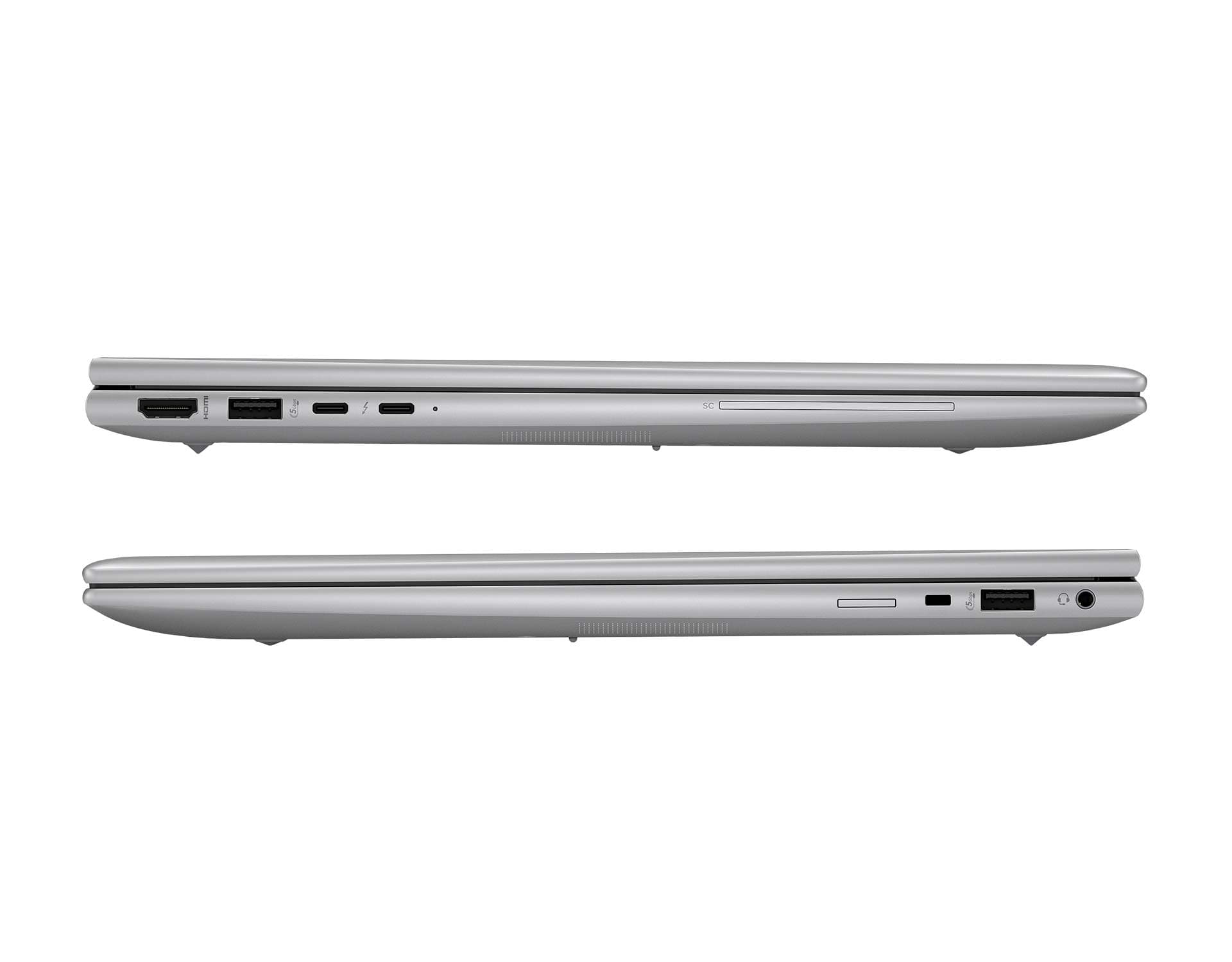
Estimated$1,500 – $2,800
Lenovo ThinkStation P620
ASUS's ProArt Studiobook 16 OLED is optimized for creators who require color-accurate OLED panels and higher-tier GPU options in a transportable package, giving exceptional visual fidelity for media and design work. It differentiates itself on this list by prioritizing display quality and creator-focused I/O, frequently delivering competitive hardware-per-dollar for professionals who value visual accuracy over enterprise service tiers.

Estimated$2,000 – $4,500
Apple MacBook Pro 16-inch M3 Max
Apple's MacBook Pro 16-inch with M3 Max leads for performance-per-watt, thermal efficiency, and real-world battery life in portable workstation tasks, leveraging unified memory and tight software optimization for demanding creative and compute workflows. Compared to the Windows-based workstations here it often delivers higher sustained performance and runtime for media editing, though buyers should weigh macOS ecosystem limitations and port/ISV differences against its premium price.

Estimated$4,000 – $6,500
Why portable workstations matter: research and evidence
Multiple lines of research and industry testing support the value of portable workstations for mobile professionals. Ergonomics and occupational studies show that a well chosen mobile setup reduces fatigue and improves productivity for knowledge workers. Hardware and battery research demonstrates that modern architectures deliver better performance per watt, extending real world runtime without compromising thermal behavior. Color science and display testing confirm that OLED and high gamut panels provide more accurate color for creative work, while independent ISV certification testing validates consistent application performance on professional software. These findings help buyers choose devices that meet professional needs while remaining practical for travel and field use.
Ergonomics: Occupational health studies find that adjustable laptop setups and shorter task-switch times reduce musculoskeletal strain and increase sustained productivity.
Performance per watt: Benchmarks and efficiency studies show recent processors and Apple silicon deliver substantial gains in performance per watt, improving battery life under heavy workloads.
Display accuracy: Colorimetry research confirms OLED and high gamut IPS panels offer more accurate color reproduction for photo and video professionals.
Thermal design: Independent thermal testing indicates that advanced cooling solutions preserve sustained performance for longer durations on thin chassis.
Software validation: ISV certification ensures consistent performance and reliability for engineering, 3D, and media applications, reducing unexpected slowdowns in professional workflows.
Frequently Asked Questions
Which portable workstation should I buy for CAD work?
Choose the Dell Precision 5690 if you want ISV-certified performance for professional apps, with a 4.4 average rating and a listing price of $2,499.55.
What GPU and CPU features does Dell Precision 5690 have?
Dell Precision 5690 includes professional-grade Intel/AMD CPU options and workstation-class NVIDIA GPUs tuned for ISV-certified apps.
How does HP ZBook Firefly 16 G11 price compare?
HP ZBook Firefly 16 G11 lists for $3,189.26 and has a 4.2 average rating, delivering a portable 16-inch form factor with entry-to-mid level professional GPUs.
Is Lenovo ThinkPad P16s Gen 3 better for security-focused buyers?
Lenovo ThinkPad P16s Gen 3 targets mobile professionals with robust security features, a 4.3 average rating, and a $3,499.00 CADlisting price.
Conclusion
In summary, portable workstation solutions in Canada give professionals a practical way to bring desktop class capabilities into mobile workflows. The five models highlighted here each serve distinct needs: Dell Precision 5690 for classic Dell reliability and ISV support; Lenovo ThinkPad P16s Gen 3 for a durable, travel friendly business workstation; HP ZBook Firefly 16 G11 for a lightweight but capable ZBook experience; ASUS ProArt Studiobook 16 OLED for creative professionals who need top display accuracy; and Apple MacBook Pro 16-inch M3 Max for unmatched performance per watt and battery life in the Apple ecosystem. For most users who want the best combination of sustained compute, efficiency, and creative tools, the Apple MacBook Pro 16-inch M3 Max stands out as the top choice, while Windows users and those needing specific ISV validation may prefer the Dell, Lenovo, HP, or ASUS options. We hope you found what you were looking for. You can refine or expand your search using the site search to filter by workload, weight, battery life, or price.