

Best Windows Tablets with Stylus in Canada — Top 5 Picks for 2026
Windows tablets with stylus combine the full desktop power of Windows with a precise, pen-first input method that is ideal for drawing, handwriting, annotation, and fast idea capture. In Canada the category appeals to a wide range of buyers: creative professionals who need pressure sensitivity and color-accurate displays, students and knowledge workers who prefer handwriting for memory and organization, and business users who want a portable device with enterprise security and full Windows application compatibility. Canadian shoppers prioritize battery life, pen latency and pressure levels, keyboard and accessory options, warranty and service availability across provinces, and value for money. Retail channels such as Microsoft Store, Best Buy Canada, Amazon.ca, and authorized brand dealers carry these devices and local reviews increasingly emphasize repairability, bilingual support, and regional pricing when deciding which tablet best fits a Canadian workflow.
Inception's AI took the time to understand this market in Canada · · How we pickWe may earn a commission on purchases. It never affects our rankings.
Top Picks Summary
Microsoft Surface Pro 9
The Surface Pro 9 is the market-leading Windows tablet with stylus thanks to its tight hardware-software integration, best-in-class pen latency with the Surface Slim Pen, and a broad accessory ecosystem that suits both consumers and professionals. It commands a premium price but delivers higher resale value and a more seamless experience than many competitors, making it the go-to choice if you prioritize pen performance and long-term platform support. Compared with the other tablets in this list, the Surface strikes the best balance of portability, display quality, and ecosystem continuity for Windows pen workflows.

Estimated$999 – $2,199
Lenovo ThinkPad X12 Detachable Gen 2
The ThinkPad X12 Detachable earns its place for buyers who want a rugged, business-focused Windows tablet with strong keyboard/trackpoint ergonomics and enterprise manageability while keeping costs lower than flagship consumer models. Lenovo leans on proven durability, ThinkPad security features, and vendor discounts that make this a cost-effective choice for corporate deployments compared with the more consumer-oriented Surface or the premium gaming-centric ROG. Technically it offers sensible ports and battery life for office-first stylus workflows, trading off some multimedia flair for reliability and lower total cost of ownership.

Estimated$1,199 – $1,999
HP Elite x2 G4
The HP Elite x2 G4 stands out for enterprise security and serviceability—features like HP’s Sure Start, long warranty options, and business-class support make it a strong pick in managed Windows tablet fleets with stylus use. Financially it competes with the ThinkPad and Latitude by bundling professional services and extended support that reduce downtime and operational costs for IT buyers. Compared with consumer-focused alternatives on this list, the Elite x2 emphasizes manageability and predictable lifecycle economics for organizations that need stylus capability without sacrificing corporate security.
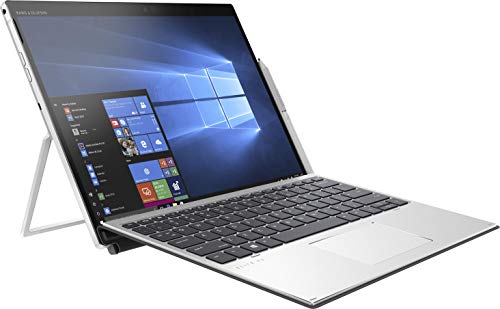
Estimated$1,199 – $2,299
Dell Latitude 7320 Detachable
The Dell Latitude 7320 Detachable is tailored for IT environments that require a lightweight Windows tablet with stylus, strong battery life, and industry-leading manageability through Dell’s ProSupport and deployment tools. It often offers competitive enterprise pricing and flexible service plans that lower long-term support costs relative to consumer devices, making it especially attractive to mid-size and enterprise buyers. Compared to the Surface and ASUS options, the Latitude prioritizes administrative features and predictable total cost rather than gaming or consumer multimedia performance.

ASUS ROG Flow Z13
The ASUS ROG Flow Z13 is the outlier on this list as a premium Windows tablet with stylus that brings discrete GPU-class graphics and high refresh-rate displays to pen-capable workflows, making it the best technical choice for creators and gamers who also need stylus input. While it is typically more expensive and heavier than the business detachables, its unmatched graphics performance provides a unique value proposition for users running GPU-accelerated creative apps on a tablet form factor. In short, the Flow Z13 trades some battery life and corporate manageability for top-tier performance that none of the other tablets here can match.

Estimated$1,599 – $3,499
Why a Stylus Helps: Research-Backed Benefits
Multiple studies and human factors research show that pen input can support creativity, learning, and precision tasks in ways a mouse or keyboard cannot. Handwriting and sketching engage different cognitive processes than typing, improving information encoding and idea generation. For artists and designers, low-latency pens with many levels of pressure and tilt recognition provide control comparable to traditional tools, while digital ink workflows speed iteration and editing. Ergonomic research also finds that a natural pen grip reduces fine-motor strain for detailed work compared with repeated mouse micro motions. These benefits are strongest when hardware and software are tightly integrated, with minimal latency, good palm rejection, and wide app support.
Improved learning and retention: Studies show longhand note taking promotes deeper processing of information than verbatim typing, which can boost comprehension and recall.
Better idea generation and sketching: Pen and paper style input encourages rapid ideation and visual thinking, useful for designers, architects, and product teams.
Precision for creative work: Low latency and many levels of pressure give artists fine control for line weight, shading, and brush dynamics.
Faster editing and annotation: Digital ink makes revising, highlighting, and sharing notes or drafts quicker than scanning and marking paper.
Ergonomics and accessibility: Natural pen grips can reduce repetitive strain during detailed tasks and support users with fine motor control needs.
Frequently Asked Questions
Which Windows tablet with stylus should I buy for drawing?
For drawing and handwriting, the Microsoft Surface Pro 9 is the safest pick since it pairs a high-resolution PixelSense Flow display with Surface Slim Pen 2 support, has an average rating of 4.2, and includes a detachable kickstand plus optional Type Cover keyboard.
Does the Surface Pro 9 support Surface Slim Pen 2?
Yes—the Microsoft Surface Pro 9 explicitly supports the Surface Slim Pen 2 for natural handwriting and drawing on its high-resolution PixelSense Flow display, and it has an average rating of 4.2.
Is the Surface Pro 9 a good choice in Canada?
The Microsoft Surface Pro 9 pairs a 13-inch PixelSense Flow display (up to 120 Hz) with Surface Slim Pen 2 support and a detachable kickstand plus optional Type Cover keyboard, and it carries a 4.4 average rating. It is offered in both Intel and ARM (Microsoft SQ3) configurations, with the ARM variant adding optional 5G connectivity.
Is the HP Elite x2 G4 compatible with HP active pens?
The HP Elite x2 G4 is compatible with HP active pens, includes an enterprise-focused detachable design, and carries an average rating of 4.1; warranty duration isn’t specified in the provided details.
Conclusion
Windows tablets with stylus offer a versatile way to work, learn, and create across Canada. Our top five picks for 2026—Microsoft Surface Pro 9, Lenovo ThinkPad X12 Detachable, HP Elite x2 G4, Dell Latitude 7320 Detachable, and ASUS ROG Flow Z13—cover a range of needs from portable productivity to high-performance creative work. For most Canadian buyers seeking a balance of performance, pen experience, and broad app compatibility, the Microsoft Surface Pro 9 is the best overall choice. We hope you found what you were looking for. If you want to refine or expand your search, use the search box to filter by price, screen size, battery life, or preferred retailer.